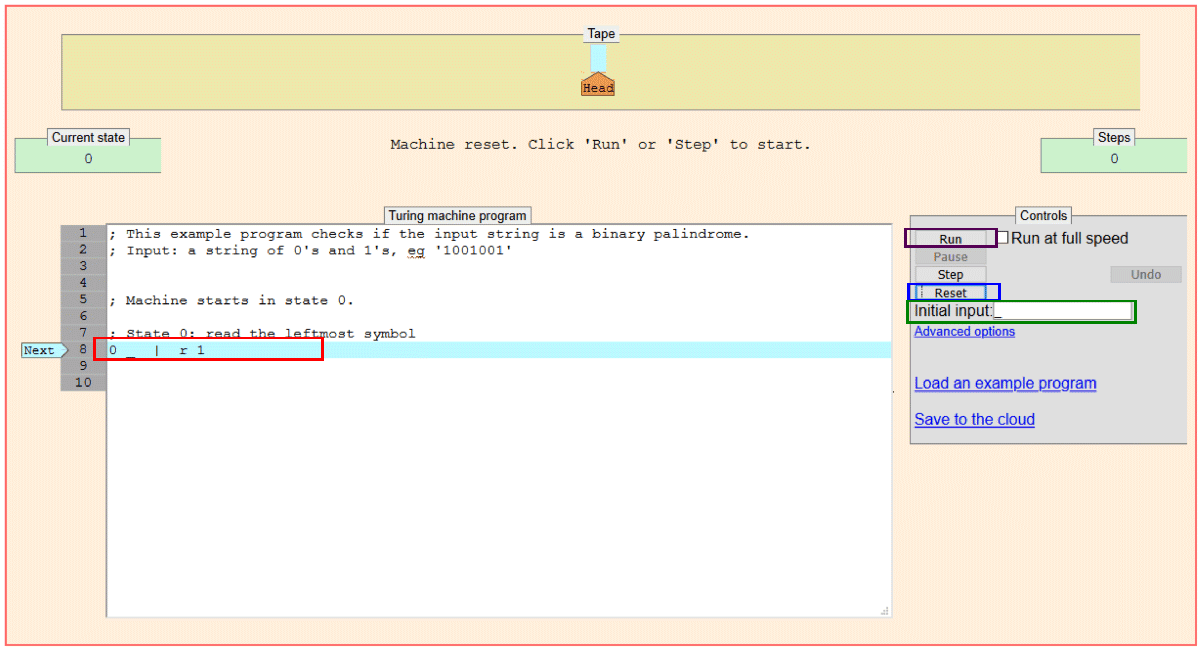
| The program interface UGI looks as
follows when you click on the link:
|
|||||||||||||||
| Each command you write for the
Turing machine must be on a single line. Each line should
contain five elements with a space in between each element and in a
specific order: <current state> <current symbol> <new symbol> <direction> <new state> Use numbers for your states starting
with 0 for your first state. Use '_' for a blank space on the
tape. Use '|' for a stroke [press shift and hit the key next
to the space bar] Use 'r' for right and 'l' [lowercase L] for
left. Try writing this below
the line reading ; State 0: read the leftmost
symbol and erase all other commands in the window. Type
a _ in the initial input window.
Hit the reset button and then the
run button. The machine should write a | in the blank move one square to the right, switch to state one and stop. If the machine does not stop hit the pause button. |
|||||||||||||||
| Now add a second line: 1 _ _ l 1
|
|||||||||||||||
| Play around with the commands for a while until you feel comfortable with
how they work. 1.) Here is a successor function calculator: 0 | | r 0 0 _ | l 1 1 | | l 1 1 _ _ r 2
It works for the following "alphabet" for natural numbers: _ = 0 | = 1 || = 2 ||| = 3 |||| = 4 ||||| = 5 and so on Paste the program in the Program Box, write several strokes in the Initial Input window, and then click Reset followed by Run. Try a few other strings. Does the program work?
|
|||||||||||||||
| 2.) Using the same alphabet (as above) can you write an adder for the positive
integers {1,2,3,4,...}? The inputs should have the structure of first addend
(number to be added), then a space, then the second addend (number to be
added). The inputs and outputs should look as follows:
Your machine should start at the beginning of the input string and stop at the beginning of the output string. Paste your adder (what you have in the program box) below or write it in:
|
|||||||||||||||
| Hint: Don't approach the problem as adding per say. Approach the problem
as getting from the input to a string without a blank in it. 3.) Test your answer on the above inputs. Does it work?
4.) Does you adder work for zero (a blank) plus some number? How
about some number plus zero?
|